# ❄️ pagedMov's NixOS dots ❄️
Special thanks to Frost-Phoenix, this config started out as a fork of his dots. [Check out his
config here](https://github.com/Frost-Phoenix/nixos-config/tree/catppuccin)
Take whatever you like, just know that the hardware configurations in my hosts folder won't work on your machine : )
My dots are written 100% in Nix so if you bring your own hardware-configuration.nix, these should work on any machine out of the box.
If you are on NixOS and have flakes enabled, you can just clone the repo and run sudo nixos-rebuild switch --flake /path/to/this-repo (again, just make sure you don't use my hardware configuration on your machine)
## Gallery

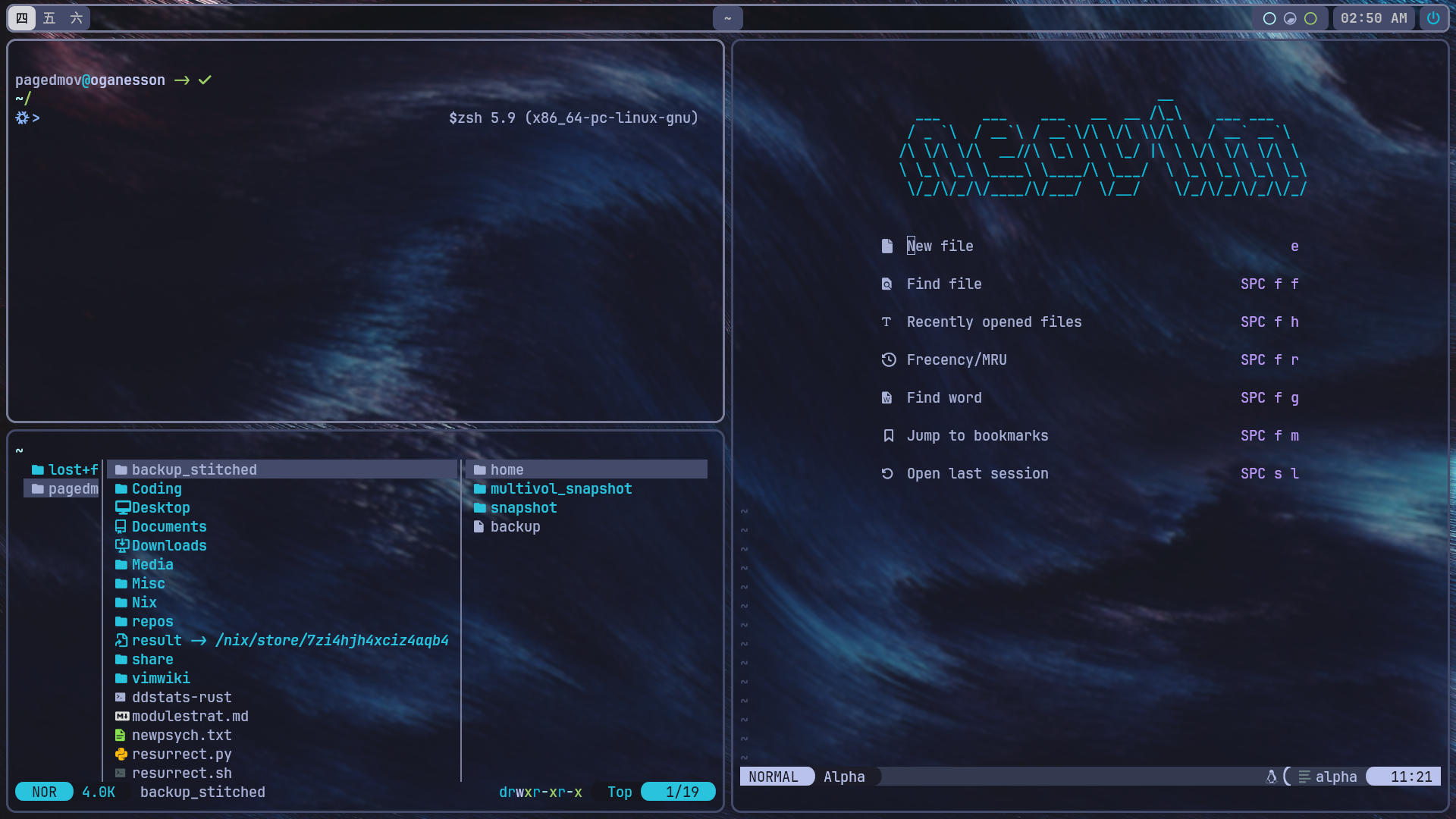
Screenshots up to date as of [this commit](https://github.com/pagedMov/nixos-config/commit/cb6593f908f24dff3451ba6ed2b900e655d674f0)
## Programs
| Component | Program |
|----------------|---------------------------------------------------|
| Window manager | [Hyprland](https://github.com/hyprwm/Hyprland) |
| Status Bar | [Waybar](https://github.com/Alexays/Waybar) |
| Launcher | [Fuzzel](https://codeberg.org/dnkl/fuzzel) |
| Terminal | [Kitty](https://github.com/kovidgoyal/kitty) |
| Shell | [zsh](https://zsh.sourceforge.io/) |
| Text Editor | [Nixvim](https://github.com/nix-community/nixvim) |
| Image Viewer | [feh](https://github.com/derf/feh) |
## Configs
Currently there are two complete system configurations available. These are:
* **Oganesson** - My desktop configuration. Generalist workflow which includes virtualization and gaming features.
* **Mercury** - My laptop configuration. My laptop is a pretty weak machine so this configuration is stripped down a bit.
The 'Xenon' config is my server configuration and is highly unlikely to be of use to anyone but me, as the setup has some very specific use-cases.
## Modules
This config uses custom modules for the home-manager and system configurations. Basically every part of the configuration can be toggled using an option, and some configs have extra options as well.
All of the options declared in these modules can be found in the documentation under docs/options
## Scripts
```chpaper``` - opens a fzf window with filenames and previews of images in $FLAKEPATH/assets/wallpapers. Picking one replaces the existing wallpaper path in $FLAKEPATH/flake.nix with the one you chose.
```chscheme``` - opens the full list of base16 color schemes in a fzf window, with a preview to see how the colors look in your terminal. When selected, replaces the chosen colorscheme in $FLAKEPATH/flake.nix with the one you chose.
```keyring``` - opens a fzf window containing all of the paths in ~/.password-store. Selecting one will use pass to copy the corresponding password to your clipboard for up to 45 seconds.
```toolbelt``` - opens a fzf menu containing some utilities that are nice to have in arm's reach; btop, alsamixer, the chpaper and chscheme scripts, among others. Bound to Super + P in the hyprland config by default.
```viconf``` - takes a partial path or filename as an argument. Attempts to find a corresponding .nix file or directory in $FLAKEPATH. If multiple matches are found, then it opens a fzf instance that allows you to choose one. Opens the file in neovim.
## Aliases
```rebuild``` == ```nh os switch```
```ga``` == ```git add```
```gcomm``` == ```git commit```
```gpull``` == ```git pull```
```gpush``` == ```git push```
```gt``` == ```gtrash```
```gtp``` == ```gtrash put```
```svc``` == ```sudo systemctl```
```svcu``` == ```systemctl --user```
```viflake``` == ```nvim flake.nix```
```pk``` == ```pkill -9 -f```
```psg``` == ```ps aux | grep -v grep | grep -i -e VSZ -e```
```sr``` == ```source ~/.zshrc```
## Bindings
'mod' is Super by default.
Utility
```mod + printscreen``` = grimblast copy area
```mod + t``` = open swaync-client
```mod + a``` = open firefox
```mod + q``` = open kitty
```mod + c``` = kill active window
```mod + e``` = open nemo (file browser)
```mod + p``` = open toolbelt script window
```mod + m``` = open fuzzel (application launcher)
```mod + r``` = open neovide (neovim GUI)
Navigation
```super + b``` = change split direction
```super + f``` = float/unfloat window
```super + g``` = fullscreen
```super + h``` = move focus left
```super + l``` = move focus right
```super + k``` = move focus up
```super + j``` = move focus down
```super + d``` = switch focus to other monitor
```super + 1``` = go to workspace 1
```super + 2``` = go to workspace 2
```super + 3``` = go to workspace 3
```super + 4``` = go to workspace 4
```super + 5``` = go to workspace 5
```super + 6``` = go to workspace 6
```super + shift + 1``` = move active window to workspace 1
```super + shift + 2``` = move active window to workspace 2
```super + shift + 3``` = move active window to workspace 3
```super + shift + 4``` = move active window to workspace 4
```super + shift + 5``` = move active window to workspace 5
```super + shift + 6``` = move active window to workspace 6
```super + s``` = toggle scrachpad
```super + shift + s``` = move active window to scratchpad
---
Important note: Some aspects of the configuration are hard coded. these include
* Hyprland config: hardcoded display outputs
* Waybar config: hardcoded display outputs
* Git config: set up like userEmail = ${username}@gmail.com, userName = ${username}, so these will be substituted with whatever you put as the username in the flake.nix file.
Many of the scripts use the $FLAKEPATH environment variable, which is set to $HOME/.sysflake by default. This variable should contain the path to this flake.